
DLG GROUP · INSIGHTS / SMART & CONNECTED HOMES
Plan a connected home around everyday life
Describe the everyday functions before choosing devices. Map local and remote operation, network dependencies, outage behaviour and account ownership through to handover.
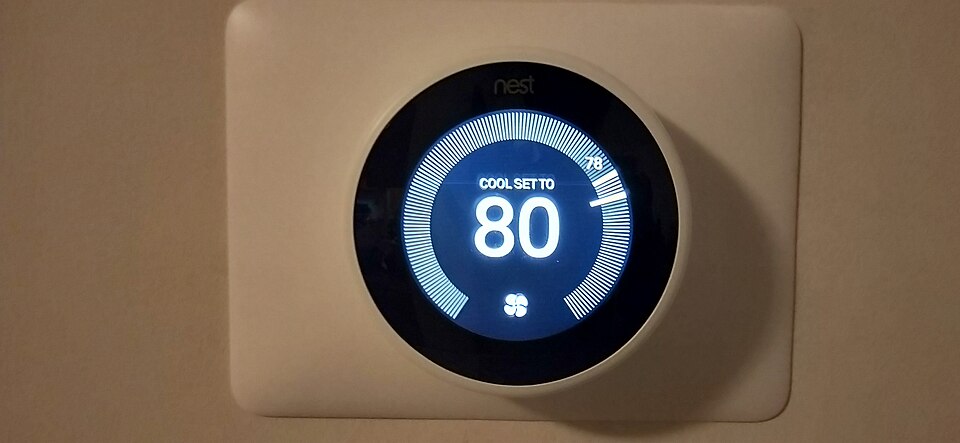
ACTUAL PHOTOGRAPH / REFERENCE
Read the control, then ask about its dependencies
Control at the wall: a photographed third-generation Nest thermostat (2019). Historical equipment reference only; the displayed setting is not a temperature recommendation and this is not a product endorsement.What to ask: which functions work at the device, which need a network or cloud service, and who controls the account?Photo: AG20044018 · Wikimedia Commons · CC BY-SA 4.0. No DLG image edits. Source and license checked October 16, 2026.

01 / Rooms, networks and controlsChapters 1–4 · Physical controls, functions and system roles.
1. Describe the experience before listing equipment
Write one sentence for each useful outcome: “The entry remains easy to use without a phone,” “The evening lighting scene can be overridden at the wall,” or “An owner can identify and revoke a former resident’s access.” Then define how the installer will demonstrate it.
| Outcome | Decision to make | Evidence to request |
|---|---|---|
| Everyday convenience | Who uses the control, and what should happen? | A short routine and an understandable physical interface |
| Comfortable rooms | What temperature, shading or lighting problem is being addressed? | Compatibility with the actual building equipment and the chosen control strategy |
| Property oversight | Which condition needs attention and who responds? | Alert recipients, acknowledgement/escalation and the limits of detection |
| Transferable ownership | What stays with the property and what is personal? | Equipment inventory, account-transfer plan and a demonstrated handover |
These are DLG scope questions. Do not infer an energy saving or resale premium from the number of connected devices.
2. Map the functions room by room
Use the following zones to organise the brief. They are not an electrical layout or a prescription to put sensors everywhere.
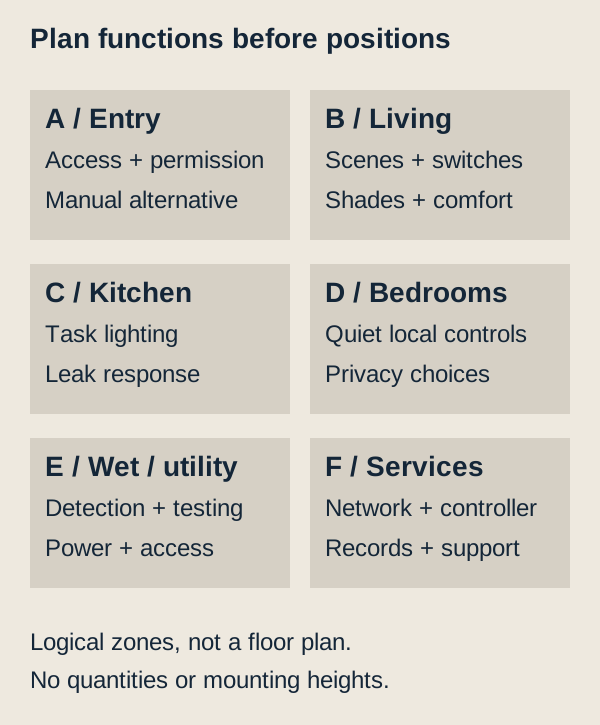
| Zone | A useful starting scenario | Coordination or acceptance question |
|---|---|---|
| Entry and access | A resident enters, a visitor is admitted and access can be revoked | Which manual access method remains, and how are temporary permissions managed? |
| Living and dining | A lighting scene and shade setting suit an evening activity | Can a person use the room without an app, and does a manual change override the scene predictably? |
| Kitchen | Task lighting remains simple and a leak alert reaches the responsible person | Is the detector reachable for testing, and what action follows an alert? |
| Bedrooms | Local controls remain discreet; a night routine does not disturb other occupants | Can each occupant change settings, and are microphones/cameras actually necessary? |
| Bathrooms and utility areas | Moisture/leak conditions prompt an agreed response | What environment, placement, power and maintenance requirements apply to the selected device? |
| Network and services | Connectivity and equipment remain accessible | Where are power, networking, service access and records coordinated? |
Record necessary, optional and not wanted separately. A useful first installation can contain a few well-tested functions rather than every available category.
3. Separate Matter, networking and control roles
The Connectivity Standards Alliance describes Matter as a local smart-home connectivity protocol using familiar networking technologies, including Wi-Fi, Ethernet and Thread; Bluetooth Low Energy is used for setup. Its FAQ also distinguishes other protocols and their possible bridge connections. [SH03]
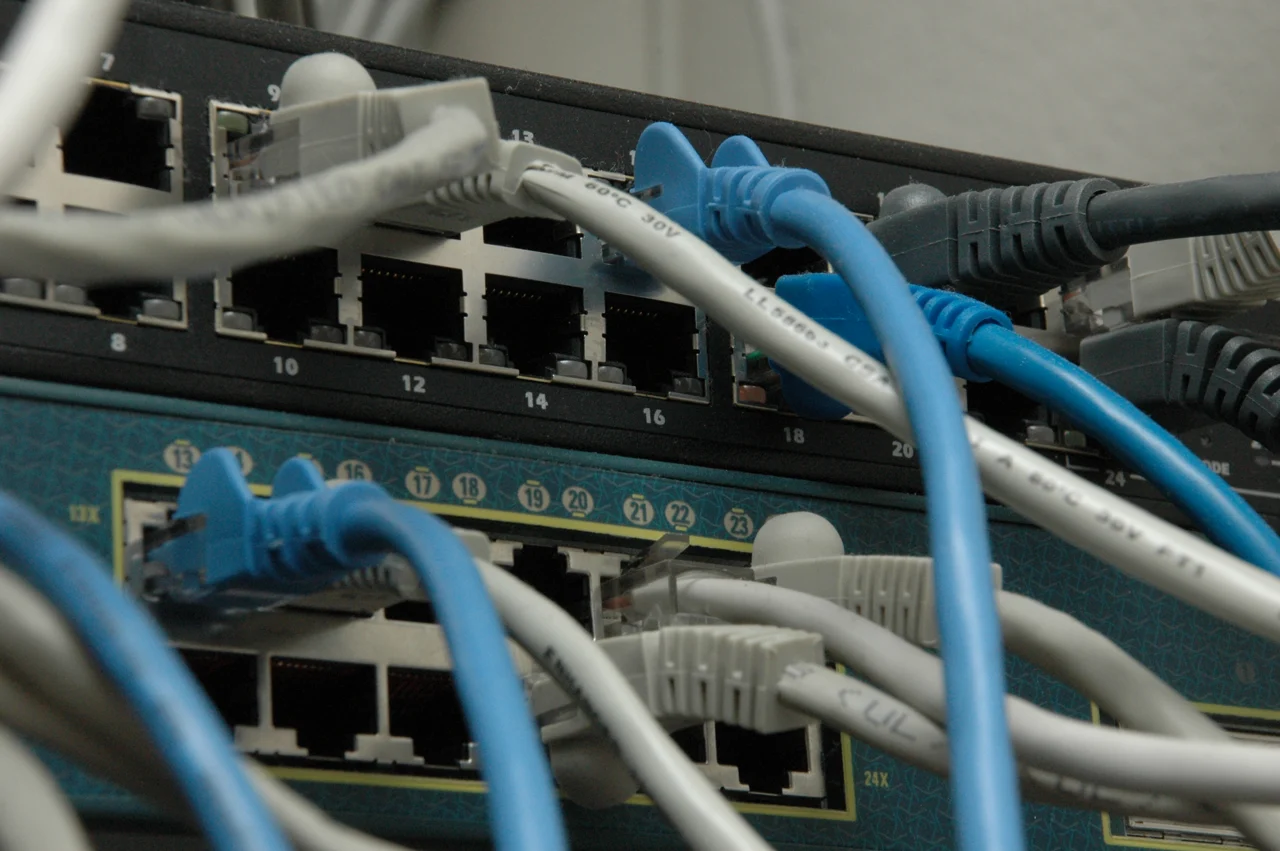
ACTUAL PHOTOGRAPH / REFERENCE
The network is physical equipment too
Two network switches and Ethernet cables photographed in 2008. This historical networking reference is not a recommended home layout, a Thread/Matter device example or proof of outage resilience.
Ask: Which router, access point, switch, controller and power supply does the actual system require, and what happens if each is unavailable?
Photo source & use
Jon 'ShakataGaNai' Davis / Wikimedia Commons. Source record · CC BY-SA 3.0. Resized and encoded as WebP; no retouching. Checked 27 October 2026. Reference only; no DLG project, product endorsement or approval of another installation is implied.

| Term | Planning meaning | What to verify for the selected system |
|---|---|---|
| Matter | An application-level way for supported devices/controllers to communicate | Exact device, supported functions, controller/platform and software requirements |
| Wi-Fi / Ethernet | Network paths used by compatible equipment | Coverage or cabling, network configuration, equipment support and power |
| Thread | A low-power IP mesh network used by compatible devices | The Thread network and the selected border-router arrangements |
| Thread Border Router | The routing role connecting a Thread network to the surrounding IP network | Whether that role is present, supported and correctly configured |
| Controller / automation platform | The role that manages supported devices and routines | Which routines run locally, where configuration lives and who administers it |
| Bridge | A supported connection between device systems/protocols | Which exact functions are exposed across it and which remain vendor-specific |
Thread Group’s topology guidance describes Thread alongside Wi-Fi/Ethernet, with border-router functionality sometimes incorporated into other equipment. [SH04] A single physical product can perform more than one role. An ordinary Wi-Fi router is not automatically a Thread Border Router, and a border-router role does not establish that the product supplies every automation function.
Closer look: network and control roles
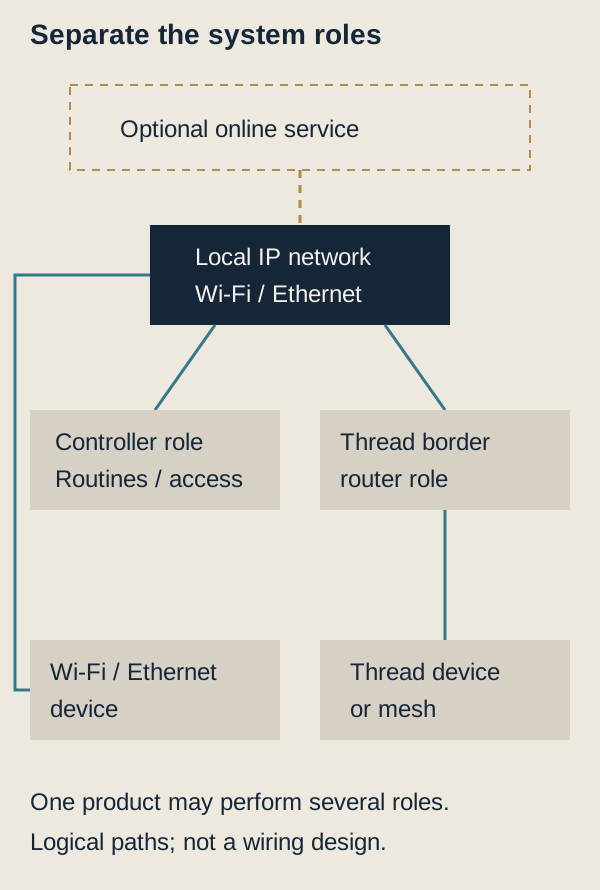
Do not assume that a Matter badge exposes every manufacturer’s advanced feature in every platform. Ask the installer to demonstrate the actual feature combination. Software updates, bridge support, app functions and any subscriptions belong in that check.
4. Coordinate controls with the building
Lighting and wall controls
Identify the intended manual control, lighting load and any dimming behaviour before choosing a smart switch or relay. Ask the electrician about the actual supply, neutral requirements of the selected product, enclosure space, load compatibility and multi-location control arrangement. These are product/design questions; there is no universal wiring recipe in this guide.
Keep the wall interface coherent with adjacent switches and finishes. Document which circuit or fixture group it operates. If power must remain available to a smart lamp for its connected functions, make the intended switching/override behaviour understandable to occupants.
Heating, cooling and shades
Confirm the thermostat/control’s compatibility with the specific HVAC equipment and proposed zones. Decide where the authoritative schedule lives; overlapping schedules in separate apps should not create unexplained behaviour. Shade controls also need motor/power, access for maintenance and a manual/failure strategy appropriate to the selected system.
Sensors and shut-off equipment
Ask which condition the sensor can detect, how it is tested, how its power source is maintained and what happens next. Detection, notification and automatic action are separate capabilities. A leak sensor does not imply that a shut-off valve exists or that it can isolate every affected service.
Required life-safety functions and their code-compliant installation must be addressed separately; a consumer automation routine should not be described as a substitute for the required alarm or protection system.
Wired and wireless infrastructure
Agree network-equipment locations, accessible cable paths, power and service access before finishes close the work. The installer should identify relevant building/electrical permits and inspections, fire-rated penetrations and any specialist requirements. Use the shared Renovation permissions and work sequence checklist for the local approval workstream.
For any proposed network separation, require the installer to verify the discovery/control paths that the selected devices need. A generic “put everything on a guest network” instruction is not an interoperability design.
02 / Failures, privacy and ownershipChapters 5–9 · Local/remote behavior, account control and transfer.
5. Distinguish local operation from remote services
Matter’s local connection does not make every app feature independent of the internet. CSA explains that remote access for Matter-only devices needs an appropriate internet-connected controller; vendors may also offer their own online paths. [SH03]
Ask the provider to complete this DLG function register for each selected system:
| Function | Local device/control | Home network/controller | Internet/cloud | Result when a dependency fails |
|---|---|---|---|---|
| Physical light control | Identify actual switch/relay path | State whether needed | State whether needed | Demonstrate; do not assume |
| Scheduled scene | Identify participating equipment | Identify where schedule runs | Identify any service dependency | Record which actions still occur |
| Temperature adjustment | Identify the local interface | Identify remote/controller functions | Identify app/cloud functions | Test the selected equipment |
| Leak notification | Identify sensing and local alert | Identify gateway/routine | Identify remote message delivery | Explain the remaining indication |
| Remote viewing/access | Identify device/power | Identify routing/recording | Identify remote authentication/service | State what becomes unavailable |
Specific example, not a universal promise: Google’s Nest support says that when the thermostat is offline, app control and some features are unavailable, while temperature can still be set on the thermostat itself. Follow the guidance for the exact model and distinguish lost connectivity from lost HVAC power. [SH05]
Separate a connection failure from a power failure. Google treats an offline thermostat that still responds at the wall differently from a blank, unresponsive display. Its guidance varies by model. [SH05] At handover, ask the installer to identify the model, demonstrate local temperature adjustment and explain the approved troubleshooting route. A working thermostat display does not establish that the heating or cooling equipment can run during an electrical outage; that depends on the actual equipment and power arrangement.
6. Plan for four different failure situations
Test only controlled, agreed scenarios with the responsible installer; do not disable required protection or critical building equipment merely to demonstrate an app.
| Situation | Question to test | Record to retain |
|---|---|---|
| Internet service unavailable | Do agreed local controls and local routines still operate? | Actual functions that passed/failed, equipment and software versions |
| Controller/platform unavailable | Can rooms and access still be used as agreed? | Manual alternatives and functions lost with that controller |
| Mains power unavailable | Which devices/network components actually have a designed power source? | Equipment/load scope and the limits of any backup arrangement |
| Vendor service or subscription unavailable | Which features remain, and can configuration or records be recovered? | Subscription, support and export/transfer terms |
An internet outage is not a power outage. A small backup power supply for a router does not power lighting circuits, HVAC plant or every connected accessory. Keep any claimed backup duration tied to the actual load and equipment assessment.
7. Make privacy and account ownership part of the brief
NIST’s consumer advice includes household agreement before buying, strong separate credentials, multi-factor authentication where available, managing unused features/privacy settings and keeping devices updated. [SH02] Turn these into named handover tasks rather than an assumption that someone will configure them later.
For each platform, identify the owner/admin, permitted residents/guests, recovery method, update responsibility and support contact. Store credentials and recovery secrets securely outside the ordinary device inventory; the inventory can reference their secure location without reproducing them.
NIST IR 8425 addresses cybersecurity across the consumer IoT product, including supporting components. It is a baseline framework, not certification of a particular house or product. [SH01] Ask what the chosen vendor commits to: security updates, support end date where published, vulnerability contact and what happens after support ends.
Cameras and microphones require an explicit decision
Decide what needs to be seen/heard, who may access it, where recordings are stored and how long they are kept. FTC camera guidance discusses encryption, network/account protection, updates, remote viewing and permission levels. [SH07] Use the selected product’s settings to implement the agreed purpose. A camera in a room is not a default feature of a “complete” smart home.
Rental or shared-property proposals need an appropriate review of resident permissions, notices and applicable law. This guide does not supply a blanket permission to record or monitor occupants.
8. Treat certification and compatibility as evidence to check
Keep the exact manufacturer/model, hardware revision where relevant, firmware, platform/controller and supported function list in the device register. Avoid a quotation that lists only “Matter light,” “smart lock” or “compatible thermostat.”
A useful compatibility test states what was attempted and in which environment. For example: a physical press, an app action, a multi-device routine, a network interruption and a recovery after power restoration are different tests. Record passed, failed, not tested or not applicable, with the date and responsible person.
Apple’s Matter guidance illustrates why platform-specific records matter: accessories can have connected-service management, and supported Thread arrangements are described separately. [SH06] Follow the actual platform/device instructions when adding or removing a service; do not assume one platform action removes every other account or administrator.
9. Prepare ownership transfer before the sale or tenancy change
FTC’s smart-home buying/selling guidance advises removing administrative access/personal information, resetting devices and reviewing account/privacy settings for the incoming owner. [SH08] Apply the relevant device procedures as a coordinated handover, keeping necessary property functions available through the transition.
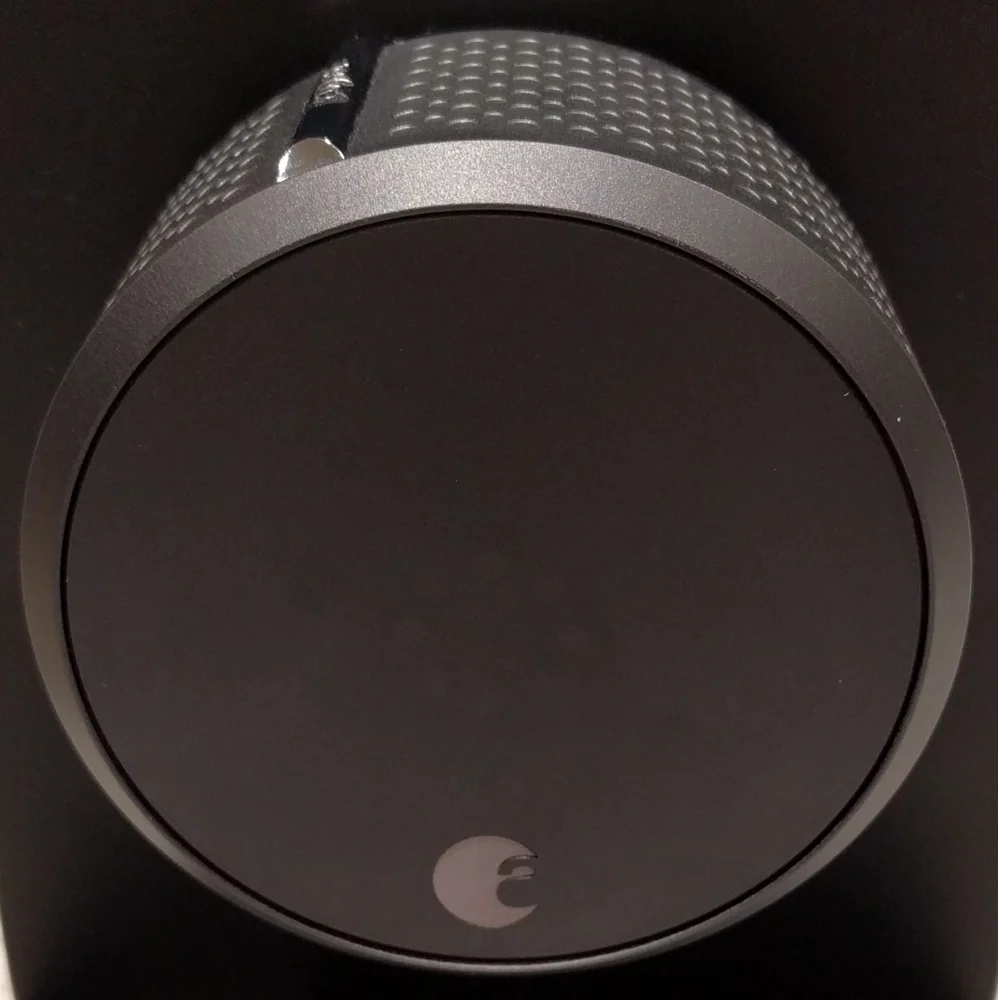
ACTUAL PHOTOGRAPH / REFERENCE
Smart lock: the device and its ownership story
A second-generation August smart lock photographed in 2017. This historical close-up illustrates a physical device; it does not establish present security, protocol support or compatibility.
Ask: Who owns the account, how is authorized access transferred, and which documented ordinary-access and battery procedures apply to the installed model?
Photo source & use
username / Wikimedia Commons. Source record · CC BY 4.0. Resized and encoded as WebP; no retouching. Checked 27 October 2026. Reference only; no DLG project, product endorsement or approval of another installation is implied.

| Handover record | What it should establish |
|---|---|
| Included/excluded equipment | What stays with the property, with exact identification |
| Network and role inventory | Which equipment supplies networking, border routing and control |
| Accounts and permissions | Who owned access and which old accounts, guests, codes and services were removed |
| Reset/commissioning record | The procedure used and the incoming owner’s successful setup |
| Routines and settings | An understandable record of intended behaviour, not another person’s private history |
| Subscriptions and licences | Transferability, cancellation, ongoing cost and any features lost |
| Manuals, updates and service | Support contacts, warranties, replacement/maintenance responsibilities |
| Demonstrated operation | Agreed manual controls, local/remote functions and tested failure behaviour |
Do not use the seller’s personal email/password as the long-term property account. Confirm the buyer or authorized incoming owner can administer the selected equipment and that the former owner’s actual access has been removed. A signed checklist is more useful when accompanied by the demonstrated device state.
03 / Scope and acceptanceChapters 10–13 · Staged planning, platform roles and the room schedule.
10. Use a staged installation and commissioning sequence
- Brief: outcomes, unwanted functions, manual operation and privacy choices.
- Survey: existing wiring/equipment/network, building conditions and permissions.
- Coordinate: exact products, system roles, support/subscription terms and permit responsibilities.
- Install infrastructure: approved electrical/network work and the required inspections before concealment.
- Commission: create the intended owner/admin, update equipment, configure each agreed function and label the records.
- Test: routine, recovery and controlled failure cases; resolve failed/untested critical scope.
- Handover: demonstrate operation and give the owner the inventory, test record and support information.
The project-specific design, authority requirements and product instructions determine the actual construction sequence. The steps above are an owner coordination framework.
11. Compare full scope and ongoing costs
A connected-home quotation should identify devices, supporting network/controller equipment, power/cabling, installation, setup, routine programming, testing, documentation and training. Ask what is excluded and how later changes are charged.
Keep recurring charges and support separate: monitoring/cloud storage, platform subscriptions, service visits, batteries and eventual unsupported equipment replacement. There is no current universal installed-cost range or return-on-investment claim in this guide. Compare the same required functions and service scope, not only device counts.
Questions to take to the provider
- Which exact functions and manual controls are included?
- Which model/platform/firmware combination has been checked?
- What depends on a controller, the internet, a cloud service or subscription?
- Which network/electrical work, approvals and inspections are included?
- How will updates, alerts, support and discontinued products be handled?
- Can the incoming owner administer the complete system without retaining the former owner’s access?
- Which demonstration and handover records will be supplied?
12. Turn a platform choice into a documented architecture
As one concrete example, Home Assistant Green uses Ethernet and requires internet for its initial setup. Its manufacturer lists approximately 1.7 W idle and 3 W under load at 12 V; its supplied 12 V / 1 A adapter rating is not a claim that the controller continuously consumes 12 W. This is a reference architecture, not a platform recommendation or a compatibility test. [SH09]
A possible arrangement is controller → home LAN → selected local devices, with a compatible Thread border router where Thread devices are used. Home Assistant’s Matter documentation identifies local IPv6 and mDNS discovery as important, and a Thread path needs a suitable border router connected to the relevant network. Separating devices across VLANs or filtering multicast can affect discovery; “good Wi-Fi signal” alone does not verify that path. Confirm each selected model, firmware and supported function before promising it. [SH10]
| Layer | What to record in the project file | Example failure to investigate |
|---|---|---|
| Controller | Hardware, software version, storage/backup, restart behaviour | Devices still have power but automations stop |
| LAN / Wi-Fi | Router/switch/AP dependencies, addressing, local access and discovery | App works remotely but cannot discover a new local device |
| Thread / other radio path | Exact border router/coordinator, network ownership and coverage | Some devices are reachable while others are isolated |
| Device function | Exposed commands/events, local/cloud path and physical override | A device pairs but the required feature is unavailable |
| Remote services | Subscription, external account, MFA and outage behaviour | Local switch works while remote notification fails |
There is no universal “Matter-compatible means every function works” acceptance rule. Record the actual functions required by the owner: for example dimming, occupancy events, valve state, battery alerts or HVAC modes. Keep unsupported proprietary extras separate. This example does not assert current Thread capability for any particular USB accessory or that a particular PV/battery integration is supported.
13. Write the room schedule and acceptance matrix together
For a hypothetical renovated home, begin with a few useful outcomes rather than a whole-house gadget list. The following tests are proposed acceptance criteria, not tests passed on installed devices. The installer should agree safe methods before demonstrating any controlled equipment; do not defeat safety systems or isolate life-safety services.
| Function | Normal operation to demonstrate | Dependency/failure demonstration | Owner handover evidence |
|---|---|---|---|
| Entry lighting | Physical switch and agreed scene both operate | Internet unavailable: agreed local behaviour remains; controller unavailable: documented manual path | Switch map, scene logic and reset method |
| HVAC scheduling | Agreed modes/setpoints and schedule changes | Vendor cloud unavailable; confirm what remains on the thermostat | Exact thermostat/HVAC compatibility, fallback and service contact |
| Leak response | Safe sensor test, local alert and selected valve response | Gateway/network failure; distinguish local alarm from remote notification | Sensor locations, valve/manual operation, test frequency |
| Door access | Owner credential, physical/emergency entry and event visibility | Phone unavailable, low battery and cloud loss | Credential ownership and revocation/recovery process |
| Energy dashboard | Correct meter sign/units and timestamp | Stale/unavailable data visibly labelled | Meter mapping and calibration/comparison record |
| Optional load management | Agreed EV/appliance deferral under a test signal | Communication lost: pre-agreed safe operating state and manual override | Control permissions, thresholds and change log |
Measure outcomes the household can understand. An illustrative project criterion might be “the hallway physical switch responds within 1 second during ten agreed demonstrations”; this is an owner/installer agreement, not a standard or measured product capability. Record observed results, date, firmware and exceptions rather than marking a generic checklist complete.
Keep an owner-controlled inventory
Every device row should include room, make/model, serial, firmware, function, radio/protocol, power source, controller, local/cloud dependencies, support end-date if published, account owner and recovery route. Store passwords, setup codes and recovery secrets in an appropriate protected owner-controlled location; the general inventory should reference their location rather than exposing them in a public file. Record which contractor access expires at handover. Back up the controller configuration and demonstrate a recovery path consistent with the selected platform; a file existing is not evidence that restoration was tested.
04 / Power and energy informationChapters 14–16 · UPS assumptions, energy control and support costs.
14. Keep the controls alive during the outage you care about
A controller on a UPS cannot reach a router, access point or border router that has lost power. For a fictional controls/network bundle, assume 3 W controller, 12 W router, 8 W access point, 7 W optical-network terminal and 5 W border router: 35 W total. Only the Green’s approximate controller value has a manufacturer reference above; all loads in this bundle are planning assumptions, and real AC input, adapters and UPS overhead must be measured.
If a hypothetical UPS has 80 Wh of available internal energy and the total conversion allowance is 85%, delivered energy is 68 Wh, giving 68 / 35 = 1.94 hours at a steady 35 W. This is a calculation example, not a UPS specification or runtime guarantee. Age, temperature, low-load behaviour, startup/output limits and recharge time matter. It provides no HVAC, pump, valve-motor or household backup rating. An internet service outage can still prevent remote access even when the local network remains powered.
See the load behind the runtime number
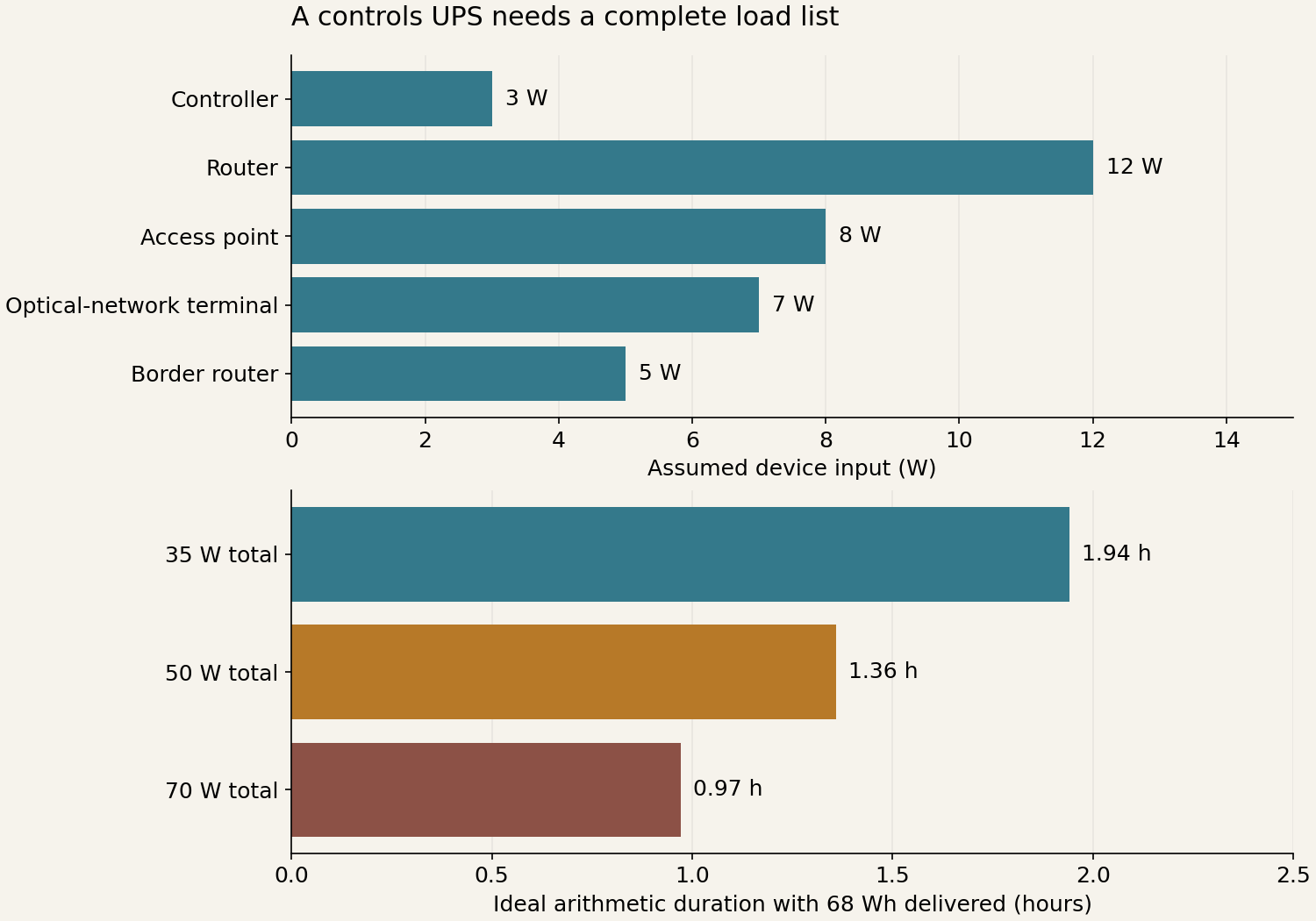
The complete assumed bundle is 35 W. The internal-energy assumption is 80 Wh; the single 85% delivery allowance leaves 68 Wh. At unchanged delivered energy, increasing the assumed load to 50 W gives 1.36 h; 70 W gives approximately 0.97 h. These are the same energy ÷ power arithmetic, not additional equipment recommendations.
Keep the measurement boundary consistent: ask whether the stated device loads include adapters, and whether the energy or efficiency figure already accounts for UPS losses. Do not add another blanket conversion allowance to a value that is already delivered at the output.
Power and connectivity need separate evidence. Ask the installer to record the powered devices, measured operating load, selected UPS output/energy limits and the service that actually continues. Local control, access from the internet and a device’s own manual control can have different dependencies. A powered router does not establish that the upstream internet connection is working.
At handover, have the responsible provider demonstrate the agreed failure scenarios through approved procedures and record the result. This diagram supplies no mains-disconnection instruction, HVAC/pump/valve-motor backup rating or guarantee of remote access. The calculator below remains available for entering a different measured load and selected energy boundary.
15. Connect energy information to useful control
Separate monitoring, advisory automation and equipment control. A read-only dashboard can show PV output, battery state and household demand without being authorized to alter backup reserves or electrical protection. A supported control integration might defer EV charging or shift a discretionary load; each command needs an identified controller, supported interface, owner permission and safe fallback.
For an illustrative rule, “defer discretionary EV charging while a chosen backup threshold is active” must define where the threshold comes from, how fresh it is, how EV departure needs are handled, and what happens when data disappears. An old value must not silently become a current measurement. Test loss of internet, controller restart, stale telemetry and manual override. Do not assume cross-brand operation, internet-free energy control or a vendor API merely because values can be displayed. Never use a general automation to bypass equipment interlocks or replace the manufacturer’s protection logic.
During renovation, the valuable interfaces often occur before walls close: accessible control locations, network/cable routes, sensor/valve service access, power for controllers and agreed manual operation. Record photographs of the actual concealed work with location/date and permission, rather than presenting an AI concept image as construction evidence.
16. Price setup, ownership and support separately
A hypothetical small project might allocate $1,200 hardware, $800 installation, $500 configuration and $250 documentation/training, then $180/year support and $6/month optional remote service. Three years total $3,506, before taxes, financing, energy use, replacements and scope changes. Every figure is invented for comparison; this is not a platform’s current subscription price or a DLG service offer. Without the optional remote service, the example is $3,290; the removed functions must be explicit.
| Ask the bidder to separate | Why it changes the comparison |
|---|---|
| Hardware and physical works | Number/type of devices, valves, approved electrical work and restoration |
| Configuration/integration | Required functions, supported versions, network changes and commissioning |
| Documentation/training | Owner accounts, inventory, manual fallback, recovery and transfer |
| Ongoing support | Included visits/hours, response arrangements, updates and backup responsibility |
| External subscriptions | Optional versus required features, recurring price assumptions and cancellation effect |
| Future property transfer | Credentials, reset/recommissioning, contractor access removal and successor documentation |
Choose on demonstrated functions and maintainable ownership. Brand quantity, a busy dashboard and a long device list cannot substitute for a documented system that continues to behave predictably when one dependency fails.
Compare a demonstrated function, not a device count
Use one room schedule across the firms. Put normal operation, manual control, dependency/failure behaviour and owner access beside each function. A product badge, powered router or app screenshot does not complete that acceptance record. Keep account secrets outside general planning notes.
Open the Smart Homes three-offer worksheet to compare eight scope and evidence questions, record each firm's answer and download your notes. The worksheet does not score firms or approve a design. Notes stay only in the current tab until you export them.
Sources, scope and review dates
This expanded guide develops the existing A Smarter Home Starts with a Clear Plan article. It covers room-by-room planning, compatibility, installation coordination, failure behaviour and handover. The examples are planning scenarios, not a tested installation or a product recommendation.
A connected home should make ordinary tasks easier to understand and operate. Start with the experience people need, then establish which devices, networks, accounts and building services must work together to deliver it.
Sources and scope
Checked 19 October 2026. General consumer guidance, standards-owner explanations and specific platform examples are kept separate. No latest specification version, universal product compatibility, code dimension, saving, security guarantee or resale premium is inferred. Diagrams and examples are DLG editorial preparation; the architectural image is an AI-generated concept.
- SH01 — NIST: IR 8425, consumer IoT cybersecurity profile. Framework scope, not product certification.
- SH02 — NIST: Seven consumer smart-home practices. Account, privacy and update practices; older label-rollout predictions are not adopted.
- SH03 — Connectivity Standards Alliance: Matter FAQ. Local connectivity, transports, bridges and remote access; no dated device-category list treated as exhaustive.
- SH04 — Thread Group: Network topologies and Matter/Thread resources. Role distinction; promotional reliability, range and battery-life claims not adopted.
- SH05 — Google: Nest thermostat offline support. English Google Home and Nest Help article reviewed 29 October 2026 through web retrieval; direct automated access returned 429. A named product-family example; local adjustment during connectivity loss does not establish operation during loss of equipment power.
- SH06 — Apple: Pair and manage Matter accessories. Platform-specific service/Thread context; not an endorsement or a universal reset recipe.
- SH07 — FTC: Secure home cameras. Privacy/account review topics.
- SH08 — FTC: Buying or selling a smart home. Transfer/reset/account principles, applied with current device instructions.
Related reading: Renovation permissions, documents and work sequence; Solar and storage. The companion package includes a blank function/device register, a commissioning/handover checklist and a future photo-led film brief. This content extends INS-SMT-001; it is not a separately operating DLG automation service or a live website release.
- SH09 — Home Assistant: Green official hardware information, checked 20 October 2026. Selected controller setup, Ethernet and approximate consumption.
- SH10 — Home Assistant: Matter integration documentation, checked 20 October 2026. IPv6/mDNS/network and Thread dependencies; not a completed compatibility test.
Earlier architectural concept illustration